
The NIST Framework explained
The Framework enables all organizations - regardless of size, degree of cybersecurity risk, location (in or outside US) or cybersecurity sophistication - to apply the principles and best practices of risk management to improve the cybersecurity. This can be done by assembling predefined and best-practice standards, guidelines, and practices.
The NIST Framework is a risk-based approach and consists of three parts: The Framework Core, the Framework Profile, and the Framework Implementation Tiers.
The Framework Core is a set of cybersecurity activities, outcomes, and informative references that are common across critical infrastructure sectors, providing the detailed guidance for developing individual organizational Profiles.
Through use of the Profiles, the Framework will help the organization align its cybersecurity activities with its business requirements, risk tolerances, and resources.
The Tiers provide a mechanism for organization to view and understand the characteristics of their approach to manage cybersecurity risk.
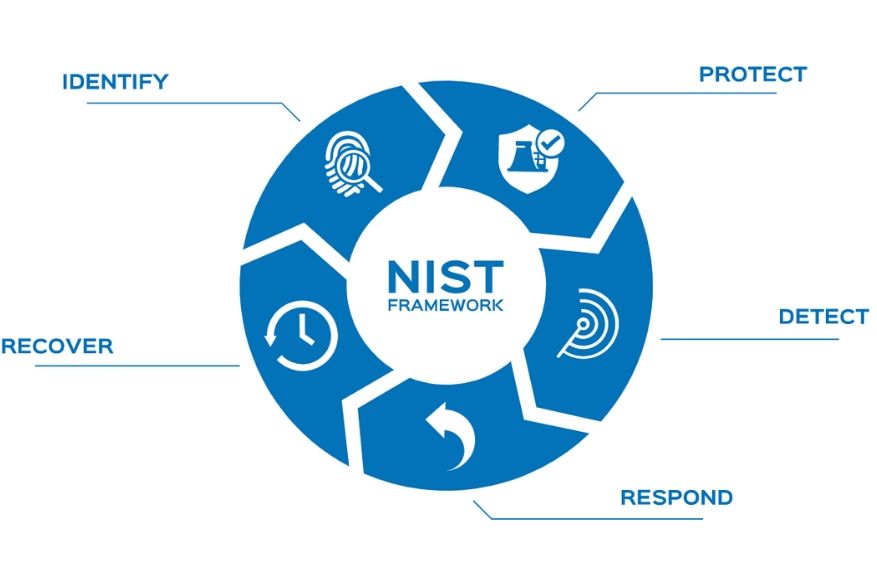
The Framework consists of five concurrent and continuous Functions: Identify, Protect, Detect, Respond and Recover. When considered together, these Functions provide life cycle of an organization's management of cybersecurity risk.
The Framework Core then identifies underlying key Categories and Subcategories for each Function, and matches them with example Informative References such as existing standards, guidelines and practices for each Subcategory.
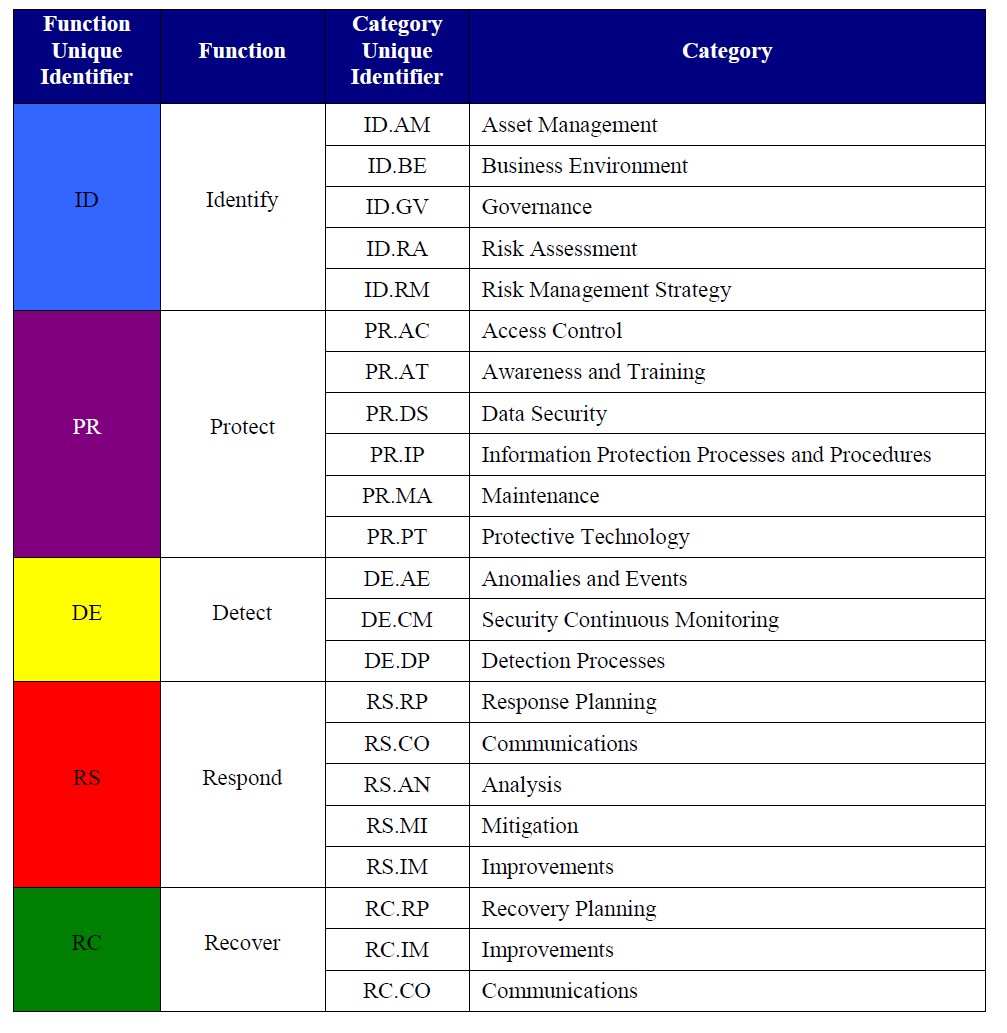
Now let's focus on the NIST guidelines and functions for Access Control, and see how CSI tools can help with the controls.
Function: Identify
Identify which SAP systems are most critical and what data in this SAP system should be protected. Identify compliance requirements and review existing policies and practices and document this information in a Current State Profile. Afterwards, conduct a risk assessment which can be used as input to create a Target State Profile. Determine the gaps between the Current and Target State Profiles to inform the creation of a roadmap.
The roadmap consists of prioritized action plans to close gaps and improve the risk posture. The roadmap can be used to establish budgets and align activities across the department(s). CSI tools delivers a Best Practice rule set. The rule set is the translation of access to critical functionality queries and SoD conflicts. This rule set can be the starting point to define which risks are applicable for the company and will be used during the Protect, Detect, Respond and Recover phase.
Function: Protect
Identity Management, Authentication and Access Control (PR.AC): Access to physical and logical assets and associated facilities is limited to authorized users, processes, and devices, and is managed consistently with the assessed risk of unauthorized access to authorized activities and transactions.
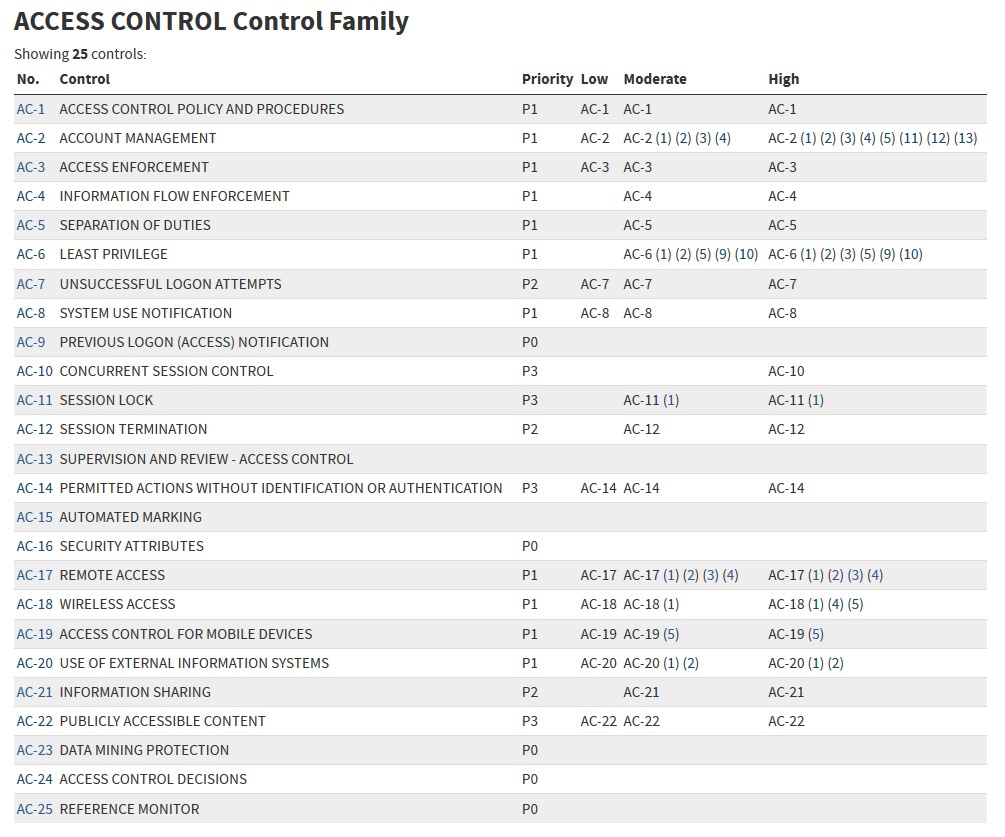
Access Control Policy and Procedures
Develop and review/update an access control policy frequently that addresses purpose, scope, roles, responsibilities, management commitment, coordination among organizational entities and compliance, to facilitate the implementation of the access control policy. This access control policy can be translated into the control module of CSI Authorization Auditor with documentation of all processes, sub-processes, risks and control measures in place.
Account Management
Identify all available SAP user accounts, this includes identifying the SAP privileged users (users with broad authorization rights). CSI Authorization Auditor provides your this information with a single click. Assign responsible persons for all SAP users and roles inI.
Access Enforcement
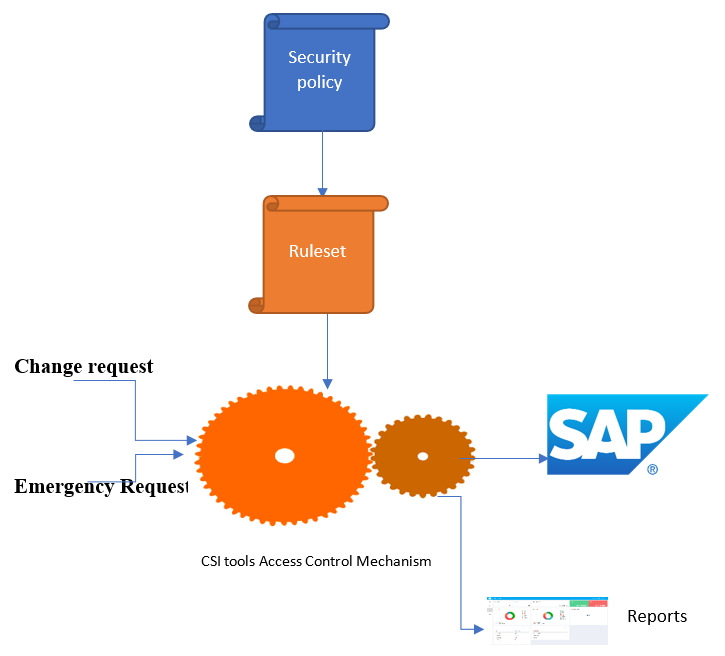
CSI tools will be used to enforce only approved authorizations for logical access to the SAP system, in accordance with applicable policy (ruleset).
Information Flow Enforcement
Information flows can be defined to inform responsible persons.
Separation of Duties
Separate duties of individuals as necessary, to prevent malevolent activity without collusion: CSI tools delivers a best practice ruleset with over 400 SoD conflicts. This best practice ruleset can be modified according to your needs; by adjusting risk indicators, adding custom developments, fine-tune on organizational entities and more. After running the SoD analysis, the users are reported having segregation of duty conflicts. Norms can be assigned to these users to state if they are allowed to have access to the SoD conflict or not. Mitigating controls can be assigned, documented and monitored to success compliance.
Least Privileged
SAP users will be assigned to having access to SAP data and functionality that is required to perform their functions. Transaction monitoring will be used to determine if access is really needed. The assignment is based on least privileged authorizations. CSI Emergency Request is implemented to grant temporary broad access rights in case of emergency situations. The access to the emergency users can be restricted and all logging is kept outside the SAP system. Full monitoring and auditing on performed activities for these emergency users, is available.
Supervision and Review
CSI tools provides reports and dashboards that can be used for analyzing, but also the full details in the causing information to get insight into how to remediate security threats. Comparisons over time will get direct insight if the security is improving.
Now that there is a clear overview of the SAP data that needs to be protected for unauthorized access. CSI tools' best practice ruleset with predefined access to critical data queries and Segregation of Duty conflicts can be used to speed up the Protect phase.
Decide and document which queries should be in scope. Perform a Query Audit. In the results: Assign norm to results of the outcome of the Query audit (users with access to critical functionality). For example: N = Not Allowed, R = Required, RM= Required but monitoring necessary. This information will be used in the following analysis as well, so you can filter on the users who are not required to have access.
Function: Detect
With our audit engine, detection of users with access to the SAP data is provided. Using the functionality of transaction monitoring provides full insight if SAP data has been accessed and/or functionality has been used. For the privileged users, full logging of all performed activities is logged and kept. A match can be done between the requests of the emergency users versus what the emergency user actually did in the system to detect anomalies
Continuously monitoring is implemented, not only for the system parameter settings, table values, monitoring but also for the implemented mitigating controls. Evidence is stored in the system so you can prove you are compliant.
Function: Respond
Should a cyber-incident occur, organizations must have a response plan ready, which includes communication lines collect and analyze information about the event, perform all required activities to eradicate the incident and incorporate lessons learned into revised response strategies.
On detected anomalies, a response is given. With proper communication, the issues are investigated, and action is taken and documented in CSI tools. Changes are kept in the logging.
Function: Recover
Organizations must develop and implement effective activities to restore any capabilities or services that were impaired due to a cybersecurity event. Your organization must have a recovery plan in place, be able to coordinate restoration activities with external parties and incorporate lessons learned into your updated recovery strategy. Defining a prioritized list of action points which can be used to undertake recovery activity is critical for a timely recovery. Because of the audit trail and logging, action can be taken to recover with CSI tools