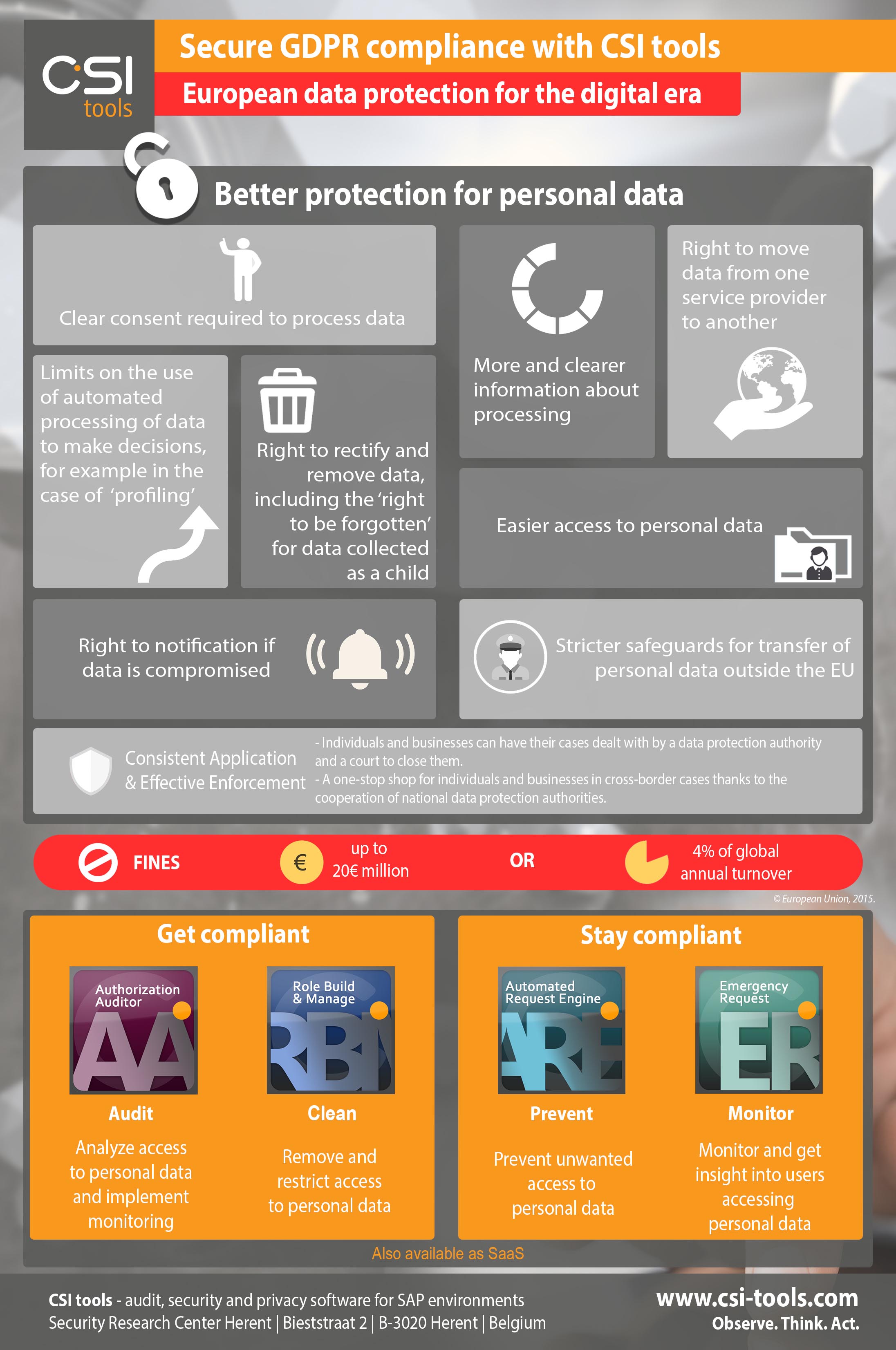

The European Commissions’ regulation for data protection rules (GDPR - General Data Protection Regulation, AVG in Dutch) in the EU shall apply from 25 May 2018. The objective of this new set of rules is to give control back to citizens over their personal data and to simplify the regulatory environments for business in the EU. SAP systems contain business critical and sensitive data including personal data which needs to be protected. Companies must follow GDPR rules for their SAP systems to ensure they are protecting Personally Identifiable Information (PII).
According to the new GDPR regulations, a breach of data protection occurs if an employee gains access to data that is not required for their occupational activity. This blog defines the four steps on how to protect this data for SAP systems and get and remain compliant for GDPR.
Step 1: Audit your environment to see where personal data is stored
The most obvious place where personal data is stored is the SAP HR system. But be aware that personal data can be stored in other SAP systems (ECC, BW, etc) as well. First, you have to investigate which systems are affective for the GDPR rule. When all systems with personal data are in scope the next step, to get compliant, can start.
Step 2: Insight in compliance - Audit who has access to the personal data
SAP is an integrated client server application. All the data resides in the SAP database server. This server is accessed by the SAP application server where all the authorization checks occur. SAP Authorizations consists of two core elements:
• Transaction codes and
• Authorizations objects with their authorization field values
Most people think that they can protect personal data in SAP systems by removing and assigning HR transaction codes to users and that the purpose of authorization objects is to restrict certain organizational levels like company codes, plants or sales organizations.
The reality however, is completely different: Only the authorization objects assigned to a user gives this user the permission to access the data, regardless if this user can execute the transaction. In a SAP system there can be more than 150.000 transaction codes while there are only 1.200 authorizations objects. The focus should not be on the HR transactions giving access to personal data because you can never know if all transaction codes are in scope. Therefore the focus should be on the core authorizations giving access to personal data.
Remark: Audit not only on users having access to personal data, but also on the SAP roles that grant access to personal data. If a role grants access to personal data, the user who is assigned to this role will get these authorizations via the role.
The SAP authorization concept is part of the security within IT systems. Besides the authorization concept, we recommend to take the following aspects into account for GDPR as well:
- Profile parameters
- System settings
- Development keys
Step 3: Remove access to personal data from people who do not need this (Get compliant)
Once the insight in the users and roles having access to personal data is there, the next step is to remove the access from the users who do not need it for their activities.
Start with remediating by removing unused roles from users. If a certain role is not used by users, this role can be removed from the user. You have to be aware that if a user is using a part of this role, the role cannot be removed from the user, but role adjustments need to be done. These adjustments will also be of influence for other users that are assigned to this same role.
Often users get undesired access to sensitive and personal data because of:
- incorrect role restriction. This can be caused by an unmaintained SU24. If a role is created and the specifications are not clear, there is a great risk that the role administrator does not restrict in the correct way.
- accumulation of access right. Even if roles are restricted properly, it is possible that by combining roles, users get more access than desired. There are two critical aspect of the authorization concept that we must understand:
- SAP's authority checks are done sequentially
- SAP has created multiple authorization objects for the same data.
Let's see what this means in real life situation:
When we have a plane ticket (X_PLANE), this plane ticket would have the following fields:
- Date
- From
- Destination
- Class
In real life you could have two plane tickets. With these two tickets we can only take two specific paths (flights):
- One to fly from Amsterdam to New York on July 3th 2014, first class
- One to fly from Brussels to London on August 16th 2014, economy class
In SAP this is usually done differently, you would have 4 authorization objects:
- X_PLANE_DTE (date)
- X_PLANE_FRM (from)
- X_PLANE_DST (destination)
- X_PLANE_CLS (class)
Now if we would arrange our life like SAP is doing its security, we would get 8 tickets:
- One ticket to fly from Amsterdam
- One ticket to fly from Brussels
- One ticket to fly to New York
- One ticket to fly to London
- One ticket to fly on July 3th 2014
- One ticket to fly on August 16th 2014
- One ticket to fly first class
- One ticket to fly economy
Those 8 tickets would be in your wallet. SAP's authority checks are done sequentially which results that you would be able to take a plane from Brussels to New York On August 16th in First class.
Step 4: Stay compliant
Once the roles are defined correctly and the assignment of these roles to users is correct, there will still be users who require access to personal data. Two types of users will need access to their data:
1. Users that are required to have access to the (own) personal data,
2. Users that temporary need broad access rights for issue and problem solving in the SAP system.
Compensating controls to monitor the activities of these users should be defined, checked and stored as audit evidence.
What about changes within the organization? Companies are always changing, with collaborations, (de-)mergers, people changing jobs, etc. Therefore it is important to implement a compliant user providing solution. For every request of users for granting new SAP roles to their user id, a preventive check must be done to see if the user does not get access to the personal data.
How CSI tools’ solutions can help
CSI tools can help get and stay compliant with the solutions from their GRC solution suite. Defining the scope of SAP systems with personal data is something organizations can do themselves; but how to mitigate the security risks? CSI tools has developed software solutions for access governance and privacy audits for SAP environments.
Audit who has access to the personal data (Get compliant phase)
CSI tools’ unique concepts help with understanding the technical security data (transactions and authorizations). CSI tools’ solutions have structured the transactions and authorization into pre-defined data elements. These data elements are easy to understand and interpret within all layers of the organization.
Our auditing solution comes with a pre-defined ruleset and all data elements related to personal data are included. When auditing on GDPR using CSI Authorization Auditor, the focus will be on the pre-defined data elements that are related to personal data. CSI Authorization Auditor provides full insight in what people are allowed to do, can do, did and can almost do with personal data.
When the data is exported from the SAP system, it is no longer possible to keep track of what happens to this data in a later stage, therefore full insight is given by CSI Authorization Auditor in people and roles having access to extract this data as well.
CSI Authorization Auditor can audit on user, role and profile level for full insight into who has access to personal data. Other important aspects regarding SAP application security, like the profile parameters and system settings, can be analyzed with CSI Authorization Auditor as well and all this audit evidence can be stored in CSI Authorization Auditor. The full monitoring/audit cycle can be defined. All the processes, sub-processes, risks, control measures, findings and controls will be in one central place. The continuous monitoring functionality safeguards all aspects regarding safeguarding personal data.
Remove access to personal data from persons who does not need this (Get compliant phase)
CSI tools’ solutions focusses not only on reporting the risks, even more, they fully support the risk mitigation process. The audit on users, roles and profiles using CSI Authorization Auditor gives full insight in all elements that have and/or give access to personal data. To remediate these security risks, CSI Role Build & Manage provides the solution to remove this unwanted access from the users and the roles with functionality like automatic role building, creating derived roles for non- organizational levels and reverse engineering.
CSI Role Build & Manage is used to build and maintain the SAP role concept. Full insight is given if and how unwanted access can be removed. With predefined checks on access to critical personal data on role level you get insight in unused roles that can directly be removed from the users, roles that are not properly restricted on the personal data and how to solve the accumulation of access rights in combination of roles.
During the role building phase, CSI Role Build & Manage checks if roles are compliant and via workflow functionality these roles are transported to the SAP environment(s). Because of this, only compliant roles will be in the system and can be assigned to users.
Stay compliant
To keep your system compliant for user - role assignment changes, every change should be approved before the access to the data is granted. For user change requests, CSI Automated Request Engine has the full functionality including approving stages and pre-defined checking of assignment if assignment of the requested roles to users will lead to access to personal data. Only requests that are approved will be assigned in the SAP system to stay compliant.
For granting temporary access to users and to get full control of users accessing personal data, CSI tools has developed CSI Emergency Request. CSI tools’ Emergency Request is the only solution on the market that gives insight into who saw and/or who manipulated HR employee data on screens (insight into user HR Info type access). Emergency Request also provides a compliant solution for granting broad temporary access rights to users including the complete logging for monitoring.