
This blog describes how you can set up the Segregation of duties (SoD) analysis for the SAP security concept. I compare 2 methods. The first one is using the standard SAP report RSUSR008_009_NEW and the second one is using CSI Authorization Auditor.
Method 1: Using Standard SAP report
It is possible to use the standard report RSUSR008_009_NEW to set up a basic SoD analysis in the SAP system (Figure 1).
rsusr008_009_NEW
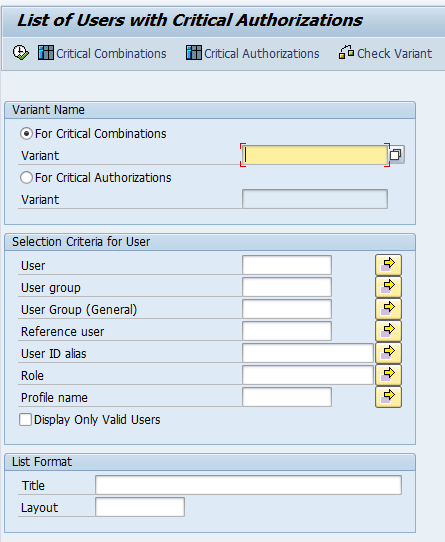 Figure 1: Report RSUSR008_009_NEW
With this report is it possible to get an overview of users/roles having access to critical authorizations and/or critical combinations (SoD conflicts). Before you can run the report, you need to define the rule set first. The rule set contains critical authorizations and critical combinations. The critical authorizations must be defined. When this is done, you can define the critical combinations. In this example I will create a simple rule set for the critical authorizations to maintain customer master data finance view. The transaction and corresponding authorizations are defined (Figure 2).
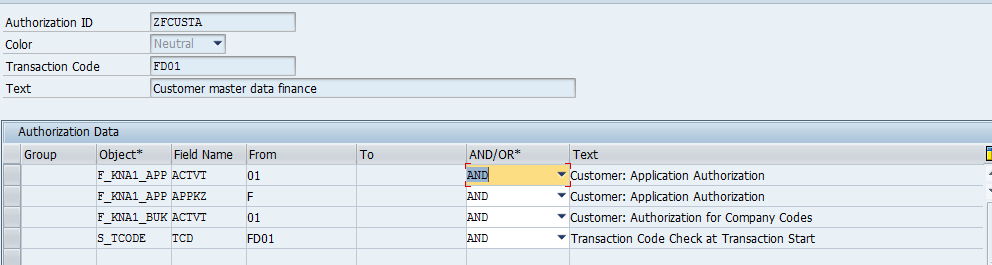 Figure 2: Set up of critical authorizations in report RSUSR008_008_NEW
After the critical authorizations are defined, the report can be run and the results (users/roles having access to the defined critical authorizations) are shown on the screen. A drill down functionality to see how the user gets the access to the critical authorizations is unfortunately not possible (Figure 3). The information that shows if the transaction was executed by the user is also missing.
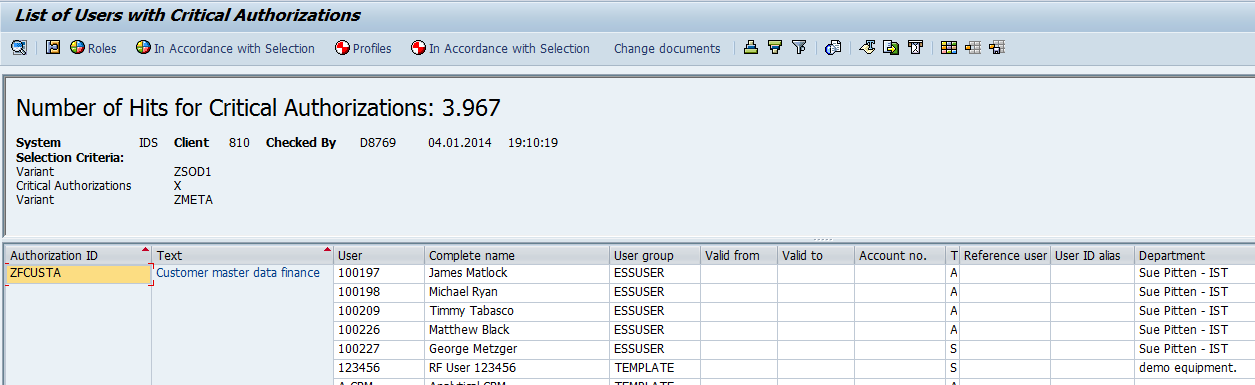
Figure 3: Results of critical authorizations user level
The report shows the assignment of the critical authorizations and does not show you the SoD conflicts. To report the SoD conflicts, you have to define the critical authorizations first, followed by the critical combinations. A critical combination (SoD conflict) is one or more critical authorizations combined with AND logic (figure 4).
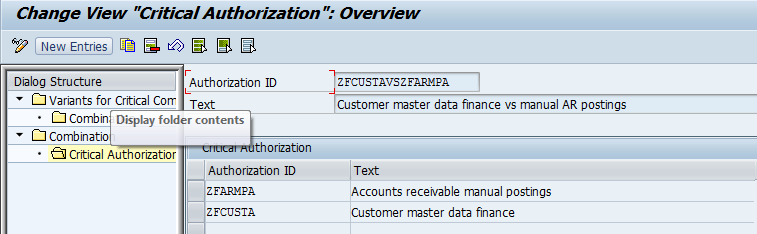
Figure 4: Definition of critical combinations in report RSUSR008_009_NEW
After the rule set with critical combinations is defined, the report runs and the users are shown. Once again, a detailed analysis how a user gets the authorizations is not possible with this report and the information if a user did really use the transactions of the SoD conflict is missing (Figure 5). The Definition of SoD conflicts is only using AND logic.
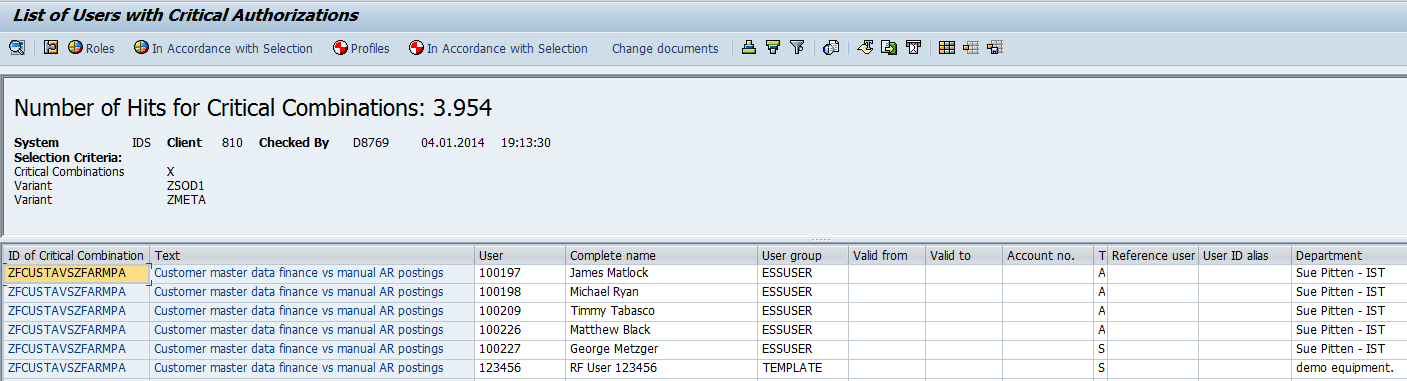
Figure 5: Results of critical combinations user level
Is it a useful report?
If the rule set is defined correctly, the report will give the overview of users having access to critical authorizations. The critical authorizations can be defined with or without S_tcode value. However, there are many cons why you should not want to use this report:
- Creating the rule set for critical authorizations and/or critical combinations is very hard. If you want to extend the rule set with your organizational values it will become very hard to implement and can lead to thousands of rules. The rule set is local to each client so you have to define a rule set in every single client. The rule set can be transported, but the rule set you want to use in the development system will be a different one compared to the one in the production system. Therefore you should not use the transport option; it will overwrite your rule set.
- No pre-defined rule set can be used. You have to implement a rule set from scratch.
- Defining the rule set will be more time consuming and costs more than buying existing external tooling.
- When you apply support packs you don’t get updates for the rule set.
- Running the report can take up a long time and is additional workload for the SAP server.
- Creating the rule set is very hard, but maintaining the rule set will even be a more complex task. Change management must be set up to the rule set maintenance and the authorizations to do this must be restricted to the authorized users.
- The results of the report are only useful for high level reporting. In order to analyze how a certain critical authorizations or combination can be removed from a user, drilling down will not give the needed information.
- Documenting remediation, exceptions and compensating controls to mitigate the risks are not possible.
- The report will detect the issues from existing users; it will not prevent unauthorized authorizations when assigning roles to users.
- Who is responsible for the rule set and who is authorized to make changes to it?
- SOD conflicts are only created with AND logic between critical authorizations.
Method 2: Using external tooling like CSI Authorization Auditor
I will use CSI Authorization Auditor 2014 to show how an external tool can be used for SoD checking. CSI Authorization Auditor comes with a pre-configured rule set with all critical authorizations and over 400 pre defined SoD conflicts. Therefore the definition of critical authorizations and SoD conflicts from scratch is not needed. This is a real time saver. The rule set can be adjusted to company values, like customized transactions, authorizations, organizational levels, locked transactions, deactivated authority checks and more. The organizational values like company codes, sales organizations or plants can be easily added and used across the analysis. If you already have a pre defined rule set for the SoD conflict and critical combinations, this can be imported into the tool as well. Changes to the rule set are logged and can be restricted for changing. Additional information regarding the critical authorizations like the risk, control objectives and suggested controls can be added to the rule set as well. The SoD conflicts can be defined with various logics like AND, OR and even NOT logic.
Figure 6 is an example of a pre defined critical authorization query, containing the critical authorizations to maintain customer master data in the finance view. The query is defined with the transactions (in the tab transactions) and the authorization values (in the tab authorization values). You can also adjust the pre defined queries and create new ones if you would like. Pre defined critical authorization query CSI Authorization Auditor part1pre defined critical authorization query CSI Authorization Auditor part2
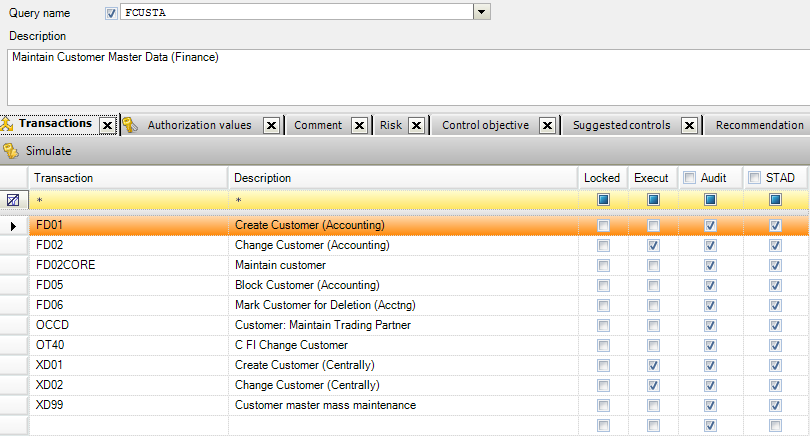
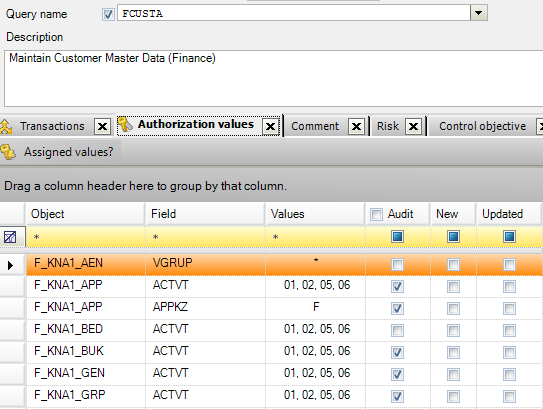
Figure 6: Pre defined critical authorizations set up
Running the queries will show the users/roles that have access to the defined critical authorizations. The result also gives more detailed information like how the users get access, via which profiles and/or roles. In the example picture below the yellow circles shows via which profiles/roles the transactions are assigned, the blue circles in figure shows via which profiles/roles the authorization values are assigned and if the user has executed the critical authorizations (red circles in Figure 7). In this example the user didn't execute (any of) the transactions for customer master data maintenance: XD01,XD02, XD99, FD02,FD05 or FD06.
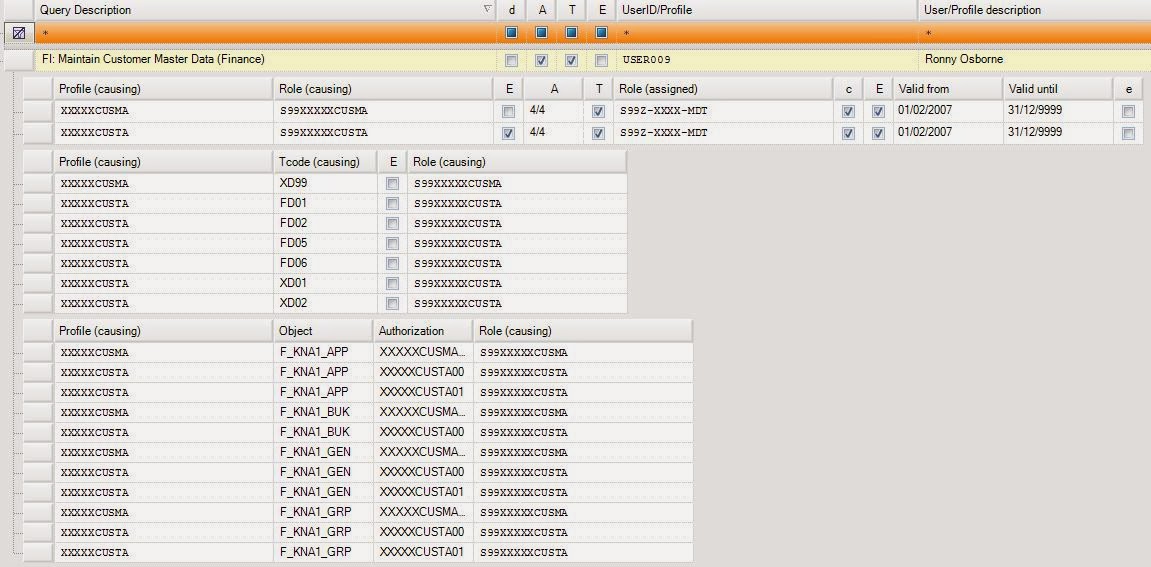 Figure 7: Results critical authorizations with detailed information
To do the SoD analysis, a pre defined SoD rule set can be used or a new SoD rule set can be defined from scratch. Defining the SoD ruleset from scratch is very simple. Every critical authorization query is stored in a library and via drag and drop you can add queries to a SoD conflict. Additional information like the risk, recommendations, compensating controls or organizational levels that are applicable, can be added as well (Figure 8).
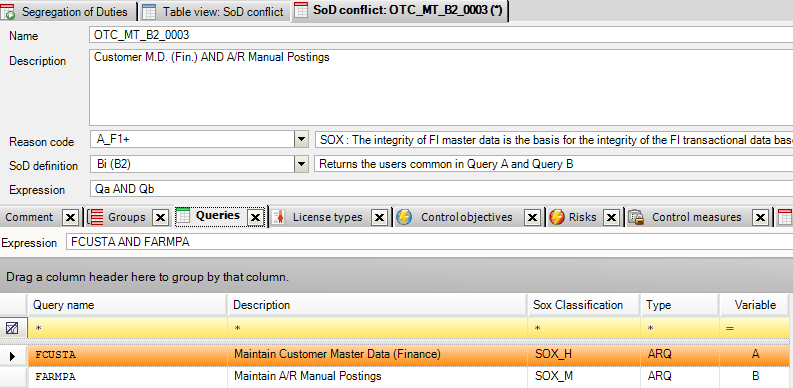 Figure 8: Definition of SoD conflict in CSI Authorization Auditor
After the critical combinations are defined, the audit can be done. The report will show the users/roles having the SoD conflict together with very useful additional information; Is the conflict executed by the user, via which role(s) or profiles does the user gets the SoD conflict, is the conflict in the role itself?
Drill down detail reports (Figure 9), high level reports, dashboards and trending reports are also possible to get a clear overview of the progress of clean up (getting and staying compliant). Because the analysis is not done in the SAP system, there is no additional workload for the SAP server.
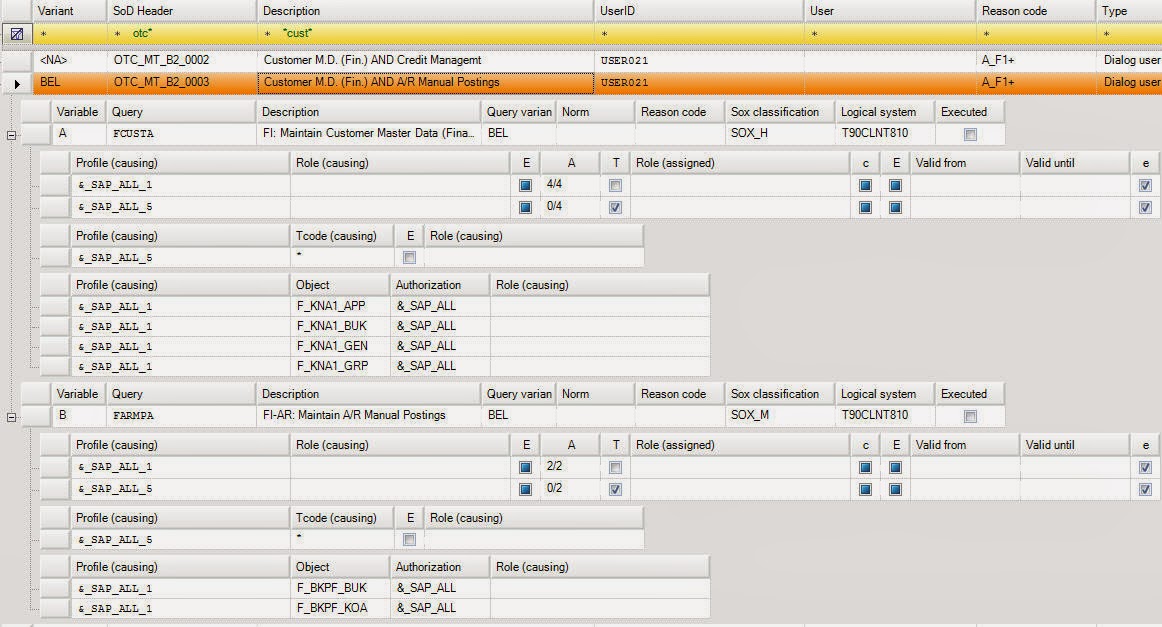
Figure 9: Results of SoD conflict with detailed information
Conclusion
Defining the report RSUSR008_009_NEW will be a very time consuming and expensive job even if your SOD rule set is quite basic. Running the standard SAP report will take quite some time and will be additional workload for the SAP server. In the end it will be cheaper to buy an existing Security concept analyzing tool that offers more value because of the analysis functionality to get in compliance. Therefore I recommend to use external tooling like CSI Authorization Auditor.
(C) Meta Hoetjes 2014
CSI Authorization Auditor and CSI Role Build and Manage are registered trademarks by CSI tools bvba
www.csi-tools.com