CSI tools Facebook CSI tools Twitter CSI tools LinkedIn CSI tools Instagram
  • Home
  • Newsroom
    • Awards
    • Events
    • Press Releases
    • Publications
  • Software
    • By Solution
      1. Access Risk Management
      2. Access Request Management
      3. Privileged Access Management
      4. Access Role Management
      5. SAP License Audit
      6. Mass User Maintenance
    • Tools
      1. CSI Authorization Auditor
      2. CSI Automated Request Engine
      3. CSI Emergency Request
      4. CSI Role Build & Manage
      5. CSI Mass User Maintenance
      6. CSI Integrate & Collaborate
    • Pathlock
    • Legacy Tools
    • Pathlock Cloud: The Successor of CSI tools
  • Customer Center
  • Community
    • CSI tools Forum
    • Meta's Blog
    • Tech Updates
    • Training
  • About
    • Contact
    • Jobs
    • Partners
      • Become a Partner
    • References
    • Testimonials
    • Sustainability
  • Login
  • You are here:  
  • Home
  • Meta's Blog Home
  • Fine tuning your GRC filter set with custom transactions

Fine tuning your GRC filter set with Custom transactions

Sometimes it is necessary to create new (custom) transactions in the SAP systems. These customized transactions should always be taken into account when doing an audit/analysis on the authorizations concept.How to identify the authorization checks for these custom transactions?

Not all custom transactions will be very critical (hopefully). But how to make sure you are including the critical ones in your analysis? First, have a look at the custom transactions that are existing. In the table TSTC, all available transactions are stored.

1.Via Se16 -> TSTC

2.Custom transactions will begin with the letter Y or Z. Search on the y* and z* transactions

3.You get the overview of all existing custom transactions

Not all custom transactions are critical, but the critical ones should be included in your analysis.

You can have a look at the name of the custom transaction via table TSTCT, but even custom transactions with harmless names can be critical. So you have to go through every custom transaction to see what it really is.

Once you have your list of critical transactions you want to include these in your rule set for auditing. But how to check if authorizations checks are included into the custom transaction? Normally a transaction can be secured by either having the authorization check included in the report itself, or by calling another transaction. How to check if the custom transaction has authorizations check(s):

-          Transactions that are secured via Call transactions and/or authority checks

1.       Via SE93 Enter the custom transaction and click button Display (example below is for transaction FD01)

2.       Double click on the program

3.       This will show the program (ABAP code). Open the Find option

4.       Enter auth and search the main program

5.       This will give you the AUTHORITY CHECKS as result.

Hint: Double click on the line to see the details of the statement

6.       Should you not find any results, it is possible that the transaction will call another transaction and it will inherit the authorization checks from the called transaction. Check for “transaction” instead of “auth”

7.       When the custom transaction calls another transaction, double click on the transaction

8.       Repeat steps 3-7 to find the authorization checks for this new transaction.
  
 Report RSABAPSC
-          There is a report in SAP that shows the AUTHORITY CHECKS statements in the program code of a (custom) transaction. How to search if the ABAP program has “AUTHORITY CHECK” statement implemented using this report
1.       VIA SA38 -> report RSABAPSC

2.       This program will trace the AUTHORITY-CHECK command that are defined in the program (ABAP code) of the custom transaction and will include the search in underlying sub programs. The recurrence level can be specified, “5” is de default value.
In the example below I did a search on the AUTHORITY-CHECK values for the(not custom) transaction F110.


Parameter transactions
Some custom transactions will be used to maintain a certain table and will be defined as a parameter transaction. In this case, the authorization check on the table authorization group must be implemented  (object S_TABU_LIN). How to check this?
1. Via SE93 enter the transaction and the result will look like
 
 
2. When the custom transaction code is a parameter transaction, the authorization group for table should be  added. Scroll down and copy the view name.
 

3. Search which table authorization groups are assigned to the view
Transaction SE11. Enter the view name and click the button display

4. The related tables for this view are shown in the sheet tables/ join conditions

5. Via Utilities -> Assign authorization group you can see the assigned table authorization groups for this view

 
The table TDDAT gives the relations between tables and table authorization groups.
 

Updating the ruleset (using CSI tools)
The next (and easiest step) is that your ruleset needs to be updated with the custom transation and its authorization check.
There are two options here:
1. you add this information to an existing query
2. you create a new query
 
1. Adding to existing query
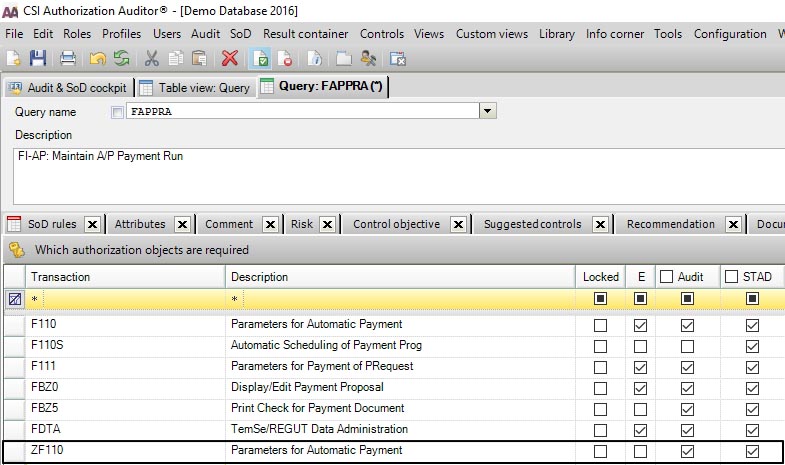
If the custom transaction has the same authorization checks as an existing query, we recommend updating the excisting query with the information.
Example: The payment run for A/P already exists and does a check on transaction codes F110, F111 with authorization objects F_BKPF_BUK FBTCH 21 en F_REGU_KOA KOART K
You discover a custom transaction "ZF110" that has the same checks on authorizations.
SImply add the new custom transaction in the lists of transactions in the qyery. Hit the save button and in a new analysis, this custom transaction is taken into account as well.
 
Zf110
2. Create a new query
If you cannot find any existing queries with checks on the same authorization (TIP: use the menu Audit -> views -> query authorization relations to check this). You can create a new query.
Create the query with the information needed, add the transaction code(s) and authorization values.
If the query should be related to a SoD conflict, also create the SoD conflicts for this query.
new query
And your ruleset is updated
 
 
(C) Meta Hoetjes 2017 CSI Authorization Auditor and CSI Role Build and Manage are registered trademarks by CSI tools bvba
www.csi-tools.com

Get in touch

Pathlock Benelux
Support Direct
Link to the support portal https://support.pathlock.com

To gain access to the new support portal, please contact us at customersupport@pathlock.com

Tel. +32 16 308 008

Address
Kempische Steenweg 303/200
B-3500 Hasselt, Belgium

Via phone
Tel: +32 16 308 000

Last Updates

  • Pathlock Cloud: The Successor of CSI tools
  • Pathlock named Market Leader for Zero Trust by Cyber Defense Magazine

Solutions

  • SoD and Risk analysis - CSI Authorization Auditor
  • Compliant Provisioning - CSI Automated Request Engine
  • Emergency Access Management - CSI Emergency Request
  • Compliant Role and Mass User Management - CSI Role Build & Manage
  • Extract SAP data - CSI Data Xtractor
  • CSI Integrate & Collaborate

©1997-2025 Pathlock Benelux. All rights reserved. - Privacy Policy  - Cookie Policy - Code of Ethical Conduct - Sitemap
