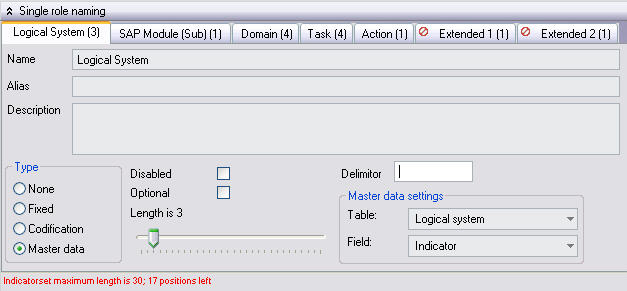
All single and composite roles are bound to a specific naming convention, depending on your concept requirements.
Note:
This only is useful if a codification already exists.
Warning:
Do not change the naming convention when the naming convention is in use.
The rebuild of role naming is not supported in current release.
Tip:
Remove all naming convention and apply the naming convention again after your modifications.(See also Mass Edit)
Note:
The naming convention can not be modified while roles still have the naming convention in use.
The naming convention should be removed before changing the convention.
An incorrect setup of role naming will result in an incorrect generation of tasks and derived composite roles.
Therefore, make absolutely sure that you have filled in the correct naming of roles.
The naming convention is applied to the whole concept. You can not use more than 1 naming convention in a concept!
It is possible to have roles with naming convention, as well as roles without naming convention in the same concept.
(Indicate on role-level that a specific role should not be bound to the naming convention).
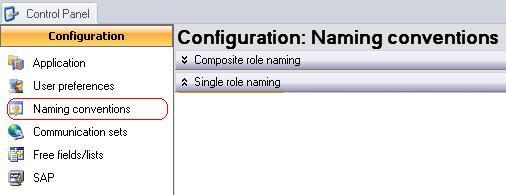
Defining the naming can be done by going to the Control Panel, which is to be found under the Tools menu:
Together they are called the indicator-set.
Each of these indicators has a set of properties.
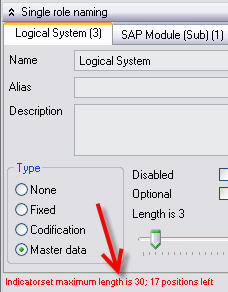
Note:
There is an indication of the number of characters used, and the number of characters still free for use at the left bottom corner.
Note:
That the positions of the indicators are mutually swappable. By changing the sequence of the indicators, the indicator-set’s sequence is altered.
Warning: Currently there is no check or engine supporting changes when roles exist in the concept. Consequences: If you modify your naming convention while roles exist, the indicator parts for roles applying naming convention will be wrong. You can deactivate naming for these roles and then reactivate; this makes sure that all indicators are stored correctly again.
This document is up to date with version 10.0.3.75 of CSI Accelerator
 The indicators